
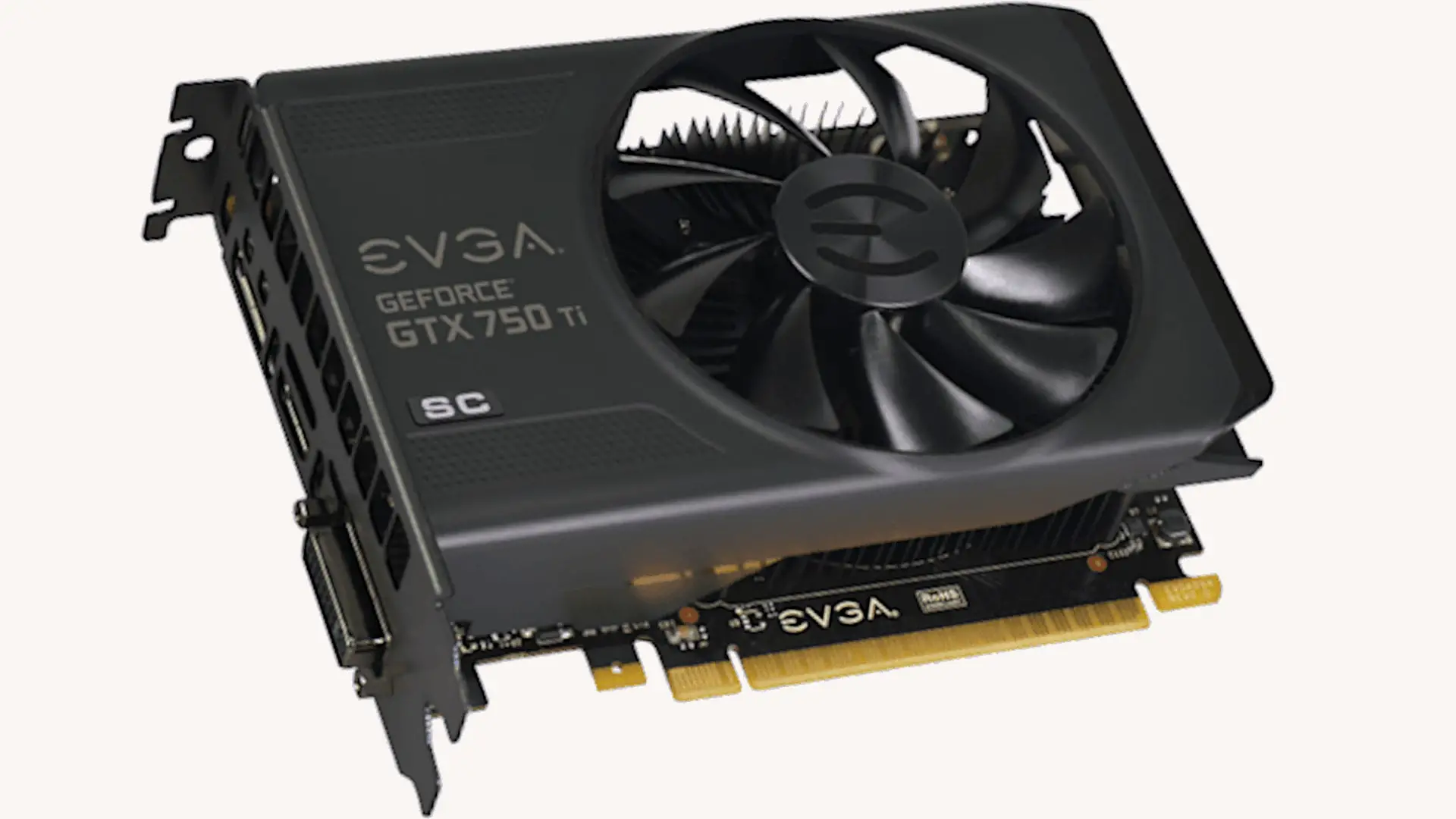
In this article, I give you my EVGA Nvidia GeForce GTX 750 Ti 2GB SC review with specs included. Who should buy it? Who should not buy it? And, what it’s useful for, what problem it solves? Those are the basic questions that I have in mind when writing a review of any product. Now, I believe that this card is a great card for a certain subset of computer users and that is those people who own a pre-built desktop computer that has integrated graphics and wants to be able to play more advanced games.
For example, let’s say that you bought yourself a nice mini Tower, something about 7-inch wide by about 6-inch tall and it came from ASUS, Acer, Dell, HP. Lenovo, one of the major name companies.
It’s a nice pretty box, it comes with Windows, it certainly works for web browsing, Skype, casual games, will certainly play solitaire, it may even play stuff like kids games like Lego Star Wars and stuff but it won’t play more advanced games. maybe you want to get into Battlefield, maybe you want to play Grand Theft Auto, Assassin’s Creed, The Witcher, you want to play Fallout 4…
There’s a number of really fun games out there that you want to play but you try a few and you discover that the performance is simply not acceptable. The reason for that is by far the majority of these pre-built systems come with what’s called integrated graphics. They will come with whatever comes on the CPU or the motherboard inside the system. It certainly is perfectly adequate for playing casual games. It’s perfectly adequate for running windows but it’s not good enough to play the really pretty and fancy games. So, that’s where this comes in. This is an excellent card to add to those types of systems.
This card is priced at $110, it has enough graphic power to play most games, even the current latest and greatest generation games at medium to high levels of graphic detail between 30 to 60 frames per second on a single 1080p monitor. Now that was a lot so let me break that out a little.
This card will not play every game at Ultra detail, it just won’t. It’s not designed for it, it’s not powerful enough but that’s okay. If you look at pretty screenshots of your games you’ll see the ultra detail does in fact look better than the medium detail. But, when you’re busy running and gunning or driving a car around town or whatever it is you’re doing, you may not look for the blades of grass to be really pretty or look how sunny the clouds are because you’re trying not to crash or be shot.
So, if you’re willing to be a little bit compromising on the detail, moving it from ultra down to high or down to medium, and you don’t want to play it greater than 1080p, this may very well be the card for you.
Now, let’s talk about 1080p really quickly. 1080p is sort of a standard Full HD resolution. It’s the resolution most of your TVs will run on and it’s the resolution that most desktop computer monitors run on, at least the ones released in the past few years. There are other resolutions but 1080p is the most common.
1080p simply means 1920 pixels across by 1080 pixels vertically. If you multiply 1920 by 1080 you get just over 2 million. That’s 2 million dots or pixels of light that the card has to draw each frame of the game. If the game is running at 60 frames a second then that poor card has to draw 120 million pixels per second, little dots of light either red, green, blue, black, on or off, whatever it may be, that’s why you need an added graphics card compared to the built-in graphics that come into most computers.
This card will run 1080p games well enough. A Battlefield 4 for example, a very popular game, thousands and thousands of people still playing. It’s actually not the latest one at the moment. Battlefield Hardline is the current latest and greatest Battlefield but a lot of people still play Battlefield 4. It will play Battlefield 4 at Ultra detail most of the time at about 45 frames per second, that’s halfway between 30 and 60. Why is that important?
I don’t consider anything below 30 frames per second to be playable, it’s too jittery, you move, and it instead of moving smoothly as you turn it goes junk, junk, frame, it kind of hops. It’s difficult to play fast-moving action games when your screen is jerking. On the other hand, anything over 60 frames a second is largely a waste because most monitors have what’s called 60 Hertz or 60 refreshes per second.
If your monitor is some other refresh rate, that is an exception but for most people, this is the case. Those monitors can’t actually display over 60 frames a second because the monitor can only refresh each of those two million dots 60 times a second so under 30 frames a second is not playable over 60 frames a second is wasted and cannot be displayed by your monitor.
This will play Battlefield 4 at 1080p Ultra 45 frames a second or 60 frames a second if you turn the detail sliders down a bit to either medium or high. For the newer games like Battlefield Hardline, you may have to move down to a higher-medium to get 45 frames a second. Newer games tend to be more stressful so you certainly aren’t going to play every game on the market at high detail.
Every game won’t be at 60 frames a second but this card should play more or less every game on the market today at least 30 frames a second at least at a medium detail level. In most games, it’ll play higher than 30 frames, somewhere in between 30 to 60 and somewhere between medium and high detail.
This is actually enough for most people. For a hundred and ten dollar card that’s actually a bargain. It used to be that you had to spend more money than that to get good performance. That’s a lot of performance in a hundred and ten dollar package.
Now, why are we looking at this as opposed to maybe a card that’s a little bit higher? Well, this card is not for just the person who has a pre-built system. Okay, if you bought a computer for between three to five hundred dollars in the past one-two-three years then you most likely have a 300-watt power supply.
That power supply most likely does not have a 6-pin PCI Express power connector. what does that you say this I don’t know if you can see it I’ll see if I can’t get a picture inserted in there somewhere. That is a 6-pin PCI Express power connector that goes into video cards and only video cards most pre-built systems from the major manufacturers do not include one of these inside the case if you go higher than this card you have to have one this is actually an adapter that converts different power cables to the six pin connector allow me to show you I have an example over here this is a gtx 960 this is a two hundred dollar car 110 200 this is not quite double the performance of this card this card will play basically everything today a 1080p and ultra detail it’s a very very nice card the issue is if you look at the top of this card this requires a 6 pin PCI Express power connector one of these and it inserts just like so in fact this adapter cable came with this card if your system has two of these type power connectors they’re called molex you may not know that it doesn’t matter they’re called molex connectors they are larger with four pins inside these have three because they’re an adapter but the ones in your computer will have four if you have two of these inside your system you can plug this into those two cables what will be convert it to one of these will plug into here and will most likely work I say most likely there are cases where it doesn’t it depends on your power supply depends on who made your computer this is not a guaranteed solution a better solution is to replace your power supply but that’s much more complicated I bring this up because I want you to understand why I like this card so much imagine for a second we have our pre-built system I undo the two screws on the side of the case here either I have to use a screw driver or the thumb screws I pull the side of the computer case off set it down I take this card I insert it into the slot and there’s only going to be one slot inside I just insert it into the only place it goes inside the machine I screw one screw into the top plate here to put it into place I take the cover I put it back on the machine I rescrew the cover back on two screws I take the video cable that was plugged into the back of my machine out of wherever it’s plugged and I plug it into the back of the video card which will be sticking out of the back there’ll be a slot that’ll be coming up the back to your computer turn the computer on go to Nvidia comm and download the latest drivers it’s easy enough to find you install them and you’re done the whole thing can be done in 15 to 20 minutes and it’s guaranteed to work you don’t have to worry about whether or not this car will work so long as it fits let’s talk about fitting briefly this is a foot what’s called a full-height card in this direction you do need a standard mini tower case if you have an extremely low profile case if the width of your case is like yay big and it’s really small this isn’t going to fit you need a different computer but if you have a case that’s about this wide about this tall this will fit just fine because it goes in horizontally it needs enough room to fit in this way lengthwise this is not an issue this is a relatively short card this will fit into basically any computer that it will fit vertically into it’s a 15 to 20 minute installation seriously it’s not that hard I will do a video which I will link later showing this car being installed into a pre-built machine and actually what you end up with is a pocket rocket of a computer gaming system if you buy my current recommended basic entry-level desktop which as of today is in a Zeus m32 CD desktop computer with an Intel i5 4 core processor those are about 450 dollars on Amazon it’s a great machine it just doesn’t have a decent graphics card it’s got eight gigabytes of RAM it’s got a 1 terabyte hard drive it’s got a real really nice four core intel six generation cpu I’ve got one in the office I’ll be doing a review of later I’ll be putting this card in that machine for 50 for the computer a hundred bucks 110 for the video card for less than $600 and if you’re really slow about it thirty minutes of your time installing this card you will actually have a really nice gaming machine Call of Duty The Witcher Assassin’s Creed Battlefield they’ll all play at reasonable speed I like this card there is no 6 pin power connector requirement you just insert this and go it doesn’t consume a lot of power it doesn’t make a lot of heat it’s not gonna even if you have a system that doesn’t have a lot of fans in it this doesn’t make a lot of heat it’s not going to overheat your system it’s wonderful let’s talk about monitor connectors for a second this has got all the monitor connectors you should need it has got in the center a standard HDMI cable which is probably what you’re using if you’re not using it using the one next to it which is a DVI digital video interface which don’t have to remember HDMI the center one that is what most TVs use the vast majority of computer monitors at the 1080p resolution used it is a very common standard you can find the cables everywhere DVI is very common for computers and if you’re not using HDMI you’re using DVI DisplayPort it does have a full sized DisplayPort connector most people find this card plugged into a standard desktop machine won’t use DisplayPort but it’s there if you need it this car does come with an adapter now if by chance you have an older monitor that still uses the blue vga connector it does have an adapter to allow you to plug into the DVI port just like so and it gives you a VGA port if you can avoid using this don’t use this that’s because it’s analog it’s out of date it’s old don’t use this if you can get away with it but it does include it if you need it so that’s pretty much it for the card inside the box there isn’t it does come in an aesthetic bag wrapped in bubble wrap but that’s not important because all the cards do it comes with a driver CD but don’t use these drivers download the latest drivers from the Vidya they release new drivers on a regular basis it comes with a little sticker for the front of your computer if you care it comes with a poster and a much larger sticker if you care and it also comes up that over here it comes with a manual which if you’ve never installed a card you may want to flip through the manual but as I said I will do a video showing the installation it really is straightforward if you watch a video of this installing it’s pretty straightforward I like this card 110 dollars on Amazon now if you decide that this card is for you I would appreciate you clicking on the link in the video description below to go to Amazon to buy it it is an affiliate link I do get a very small Commission it doesn’t change your price but the benefit is it helps me fund these videos so that I can do more of them for you because that’s the only way I get funding for this because I’m not paid by EVGA to do these and certainly YouTube is not paying me to do them but I would appreciate it if you’d use that link like this video if you like it don’t like it if you don’t like it please click my subscribe button below I would certainly appreciate it leave me a comment below did you buy this card how was it what game do you play what kind of performance did you get were you happy with it did you replace an existing dedicated graphics card maybe a four or five year old card with this and are you happy with it do you recommend something else that doesn’t require a six pin power Express connector by all means I’m interested in your feedback if you have any specific questions about it leave those below and I’ll answer them if I can and I guess that’s pretty much it.
In summary, I recommend this card. It’s a great little gaming card if you are willing to be flexible with your quality settings. I’ve been very happy with it. I’ve got one installed in the pre-built machine that I bought at an auction.
EVGA Nvidia GeForce GTX 750 Ti 2GB SC
-
Performance - 95%95%
-
Price - 93%93%
-
Value - 94%94%