
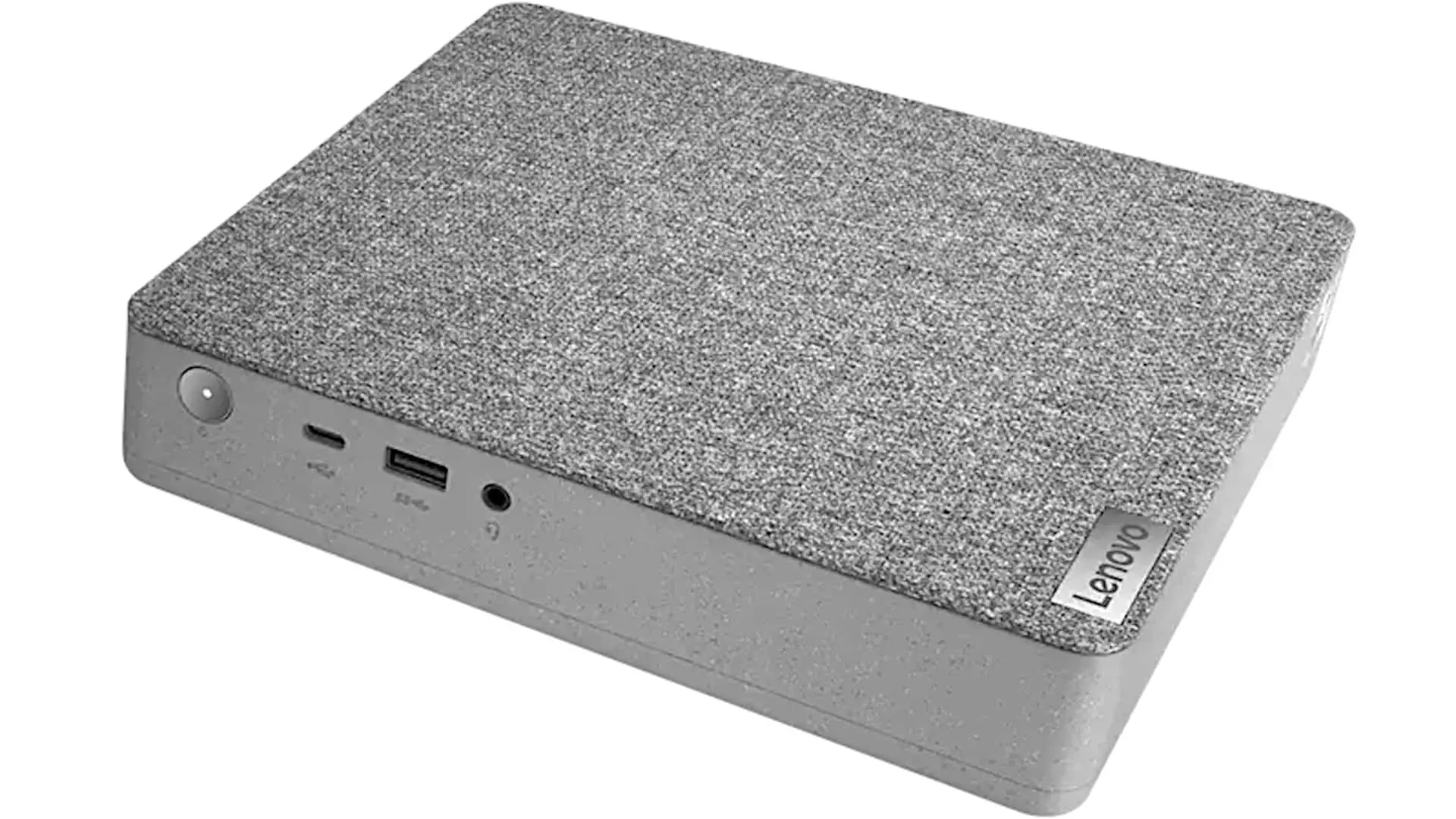
In this article, I give you my Lenovo IdeaCentre Mini 5i review with specs included. So, this is a mini pc sort of like a NUC or a Mac Mini. This Lenovo created new liner products; I call them the rug tops. Notice it has a textile finish.
The idea is it’s supposed to look nice in your home, and yes, you can actually rip the top off. I think it would be fun if they actually offered different kinds of textile finishes and stuff that you could put on here, so that Lenovo goes ahead, but anyway it is upgradable.
Who Is This For?
Not every person who needs a capable desktop PC wants to spend a fortune or dedicate a large chunk of desk space to a tower. For anyone working from home, studying remotely, or simply looking for a compact everyday computer that does not break the bank, the Lenovo IdeaCentre Mini 5i makes a compelling case for itself. It occupies a price point that most NUCs and business-grade mini PCs from brands like Lenovo’s own ThinkCentre line simply cannot touch, starting just under $500 and topping out at $629 for the higher-end configuration reviewed here. For the target audience, that pricing is a significant part of the appeal.
The IdeaCentre Mini 5i is also designed with the assumption that users already have, or plan to purchase, a separate monitor. Rather than squeezing everything into a laptop or committing to the higher cost of an all-in-one, this machine lets you pair a compact PC with whatever display you prefer, whether that is a large 4K monitor for comfortable work-from-home setups or a spare screen you already own. Most households have an extra keyboard and mouse lying around too, which lowers the barrier to entry even further.
Processor Options: Core i3 vs Core i5
One of the more interesting aspects of the IdeaCentre Mini 5i is its use of desktop-class processors rather than the lower-power mobile chips commonly found in compact PCs and NUCs. This distinction matters more than it might initially seem, as desktop CPUs generally deliver better sustained performance under load compared to their mobile counterparts at similar price points.
The two processor options available do come with some nuances worth understanding. The Core i3 model uses a full 65-watt desktop processor, which offers strong single-core performance but is limited to four cores. The Core i5 model, which is the unit featured in this review, uses a 35-watt desktop variant designed for thin all-in-one computers and compact mini PCs. It drops the wattage but gains two additional cores, bringing the total to six. In practice, the trade-off between lower power consumption and higher core count may result in the two models performing more similarly than their names suggest, particularly for everyday multitasking where the extra cores on the i5 offset the reduced clock headroom.
Both processors are socketed rather than soldered, which means that upgrading the CPU at a later date is physically possible. The Core i3 model ships with a 135-watt external power adapter to accommodate its higher thermal demands, while the Core i5 model comes with a 90-watt adapter. Anyone considering a future processor upgrade should keep the power supply wattage in mind, as pushing beyond the rated thermal envelope of the included adapter may require sourcing a more capable unit.
Memory and Storage
Memory configuration on the IdeaCentre Mini 5i is handled through two physical DDR4 RAM slots, which is a welcome design choice. The system ships with either 8GB or 12GB of RAM depending on the configuration, and the 12GB option, while an unusual figure, is achieved through two physical modules rather than any partially soldered arrangement. Both slots are fully accessible and upgradeable, meaning users can expand capacity to 16GB or potentially 32GB without any unusual modifications.
Primary storage comes in the form of a single M.2 SSD slot. The base Core i3 model includes a 128GB boot drive, while the Core i5 configuration steps up to 256GB. Both are PCIe SSDs offering decent read and write speeds for everyday use. It is worth noting that although the motherboard appears to have provisions for a second SSD slot, the connector for it has not been populated from the factory, limiting the user to one M.2 drive.
Mass storage is handled by a conventional 1TB 5400rpm hard drive, which is included in both configurations. This serves as the primary location for documents, media, and large files, complementing the faster but smaller boot SSD. The architecture is straightforward and familiar, and while a hard drive is not as fast as a second SSD would be, it provides useful storage capacity at a price point that helps keep the overall cost down.
Performance and Everyday Usability
The IdeaCentre Mini 5i positions itself firmly in the mid-range computing tier, and it is well-suited to the kinds of tasks that most home and office users actually need a PC for. Video conferencing through platforms like Zoom, light multitasking, web browsing, streaming video, and general productivity work all fall comfortably within its capabilities. Running a video call while simultaneously watching YouTube in another window, for example, is not a problem.
Photo editing for hobbyist or occasional use is also handled well. Casual Photoshop work, image organization, and light retouching are reasonable expectations for this machine. However, users engaged in professional-grade video editing in applications like Adobe Premiere, or those doing high-volume photo processing for eight hours a day, will likely find the IdeaCentre Mini 5i reaching its limits and should consider a more powerful system.
The machine uses Intel UHD 630 integrated graphics, which is the variant associated with desktop processors rather than the newer Intel Iris Xe graphics found in recent mobile platforms. It is not a gaming GPU by any measure, but it is capable enough for 4K display output and handles everyday graphical tasks without complaint. Hooking the review unit up to a 4K monitor produced no issues whatsoever, which is a practical consideration for users who want a clean, high-resolution workspace.
Thermals and Noise
One of the practical advantages of a mini desktop over a laptop is that thermal management is generally less of a concern from a user perspective. The IdeaCentre Mini 5i does not get uncomfortably warm to the touch during normal use, and the chassis size gives it enough internal volume to dissipate heat reasonably well. Even during benchmark runs and more demanding workloads, the system did not produce the kind of fan noise that becomes intrusive during calls or quiet work sessions. The cooling solution is audible if you are in a quiet room and listening for it, but it is far from disruptive and certainly will not raise eyebrows during a video meeting.
Ports and Connectivity
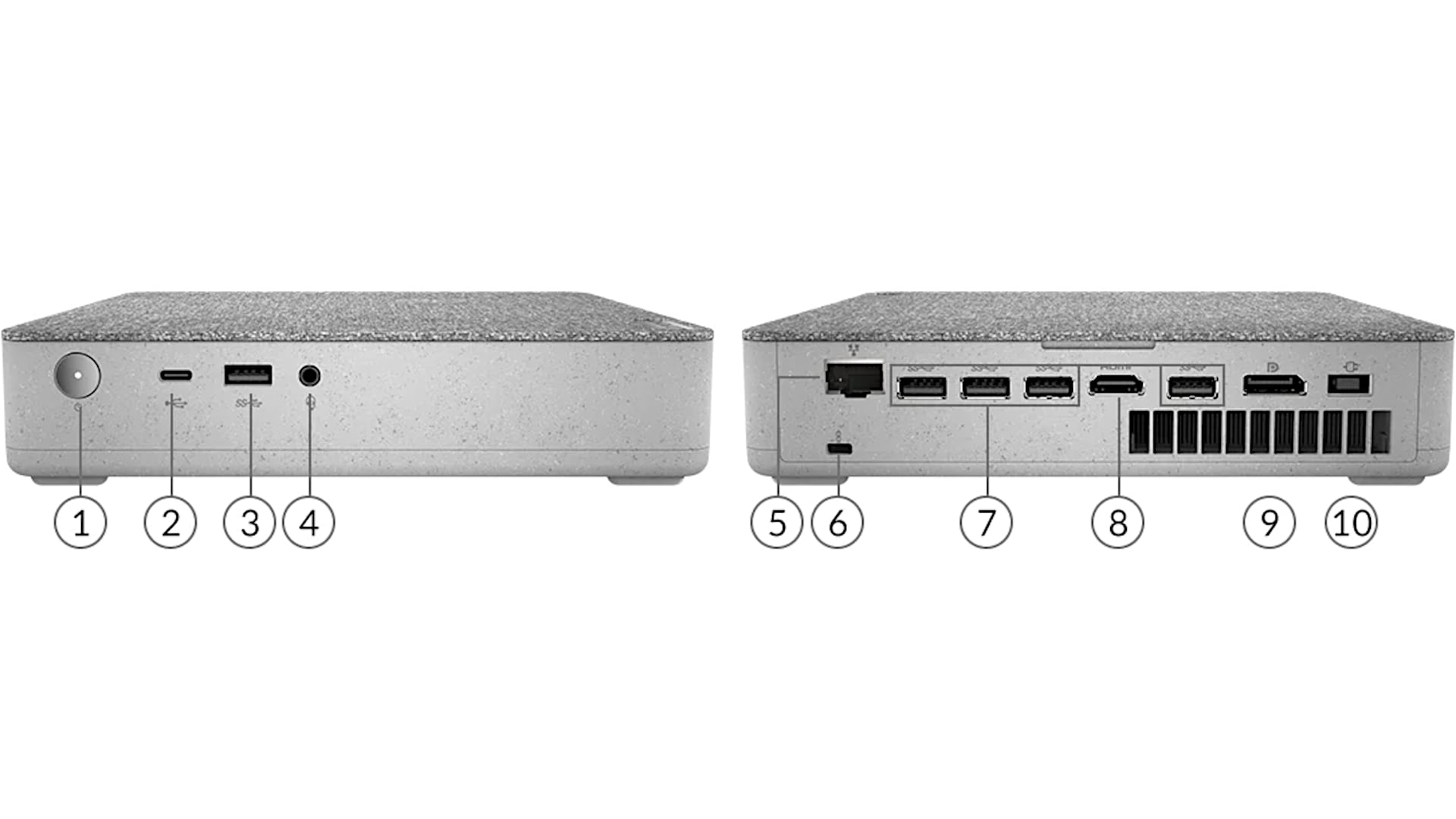
The port selection on the IdeaCentre Mini 5i covers the bases adequately for its target audience. On the USB front, there are five USB-A 3.2 ports in total, including one conveniently positioned on the front panel for easy access. A front-facing USB-C 3.2 port is also included, though it should be noted that Thunderbolt 3 is not supported. A headphone jack is accessible from the front as well.
The rear panel provides full-size HDMI and DisplayPort outputs for connecting up to two external displays, along with a wired Ethernet port. Wireless connectivity is handled by Intel Wi-Fi 6 and Bluetooth 5.1, which are solid choices for a machine in this price range. There is no built-in speaker, so users will need to connect external audio through headphones or desktop speakers.
Getting Inside: Disassembly and Upgradeability
Accessing the internals of the IdeaCentre Mini 5i is a two-stage process. The first and simpler stage involves removing just three screws to lift off a top panel, which exposes the two RAM slots and the M.2 SSD slot. This is about as straightforward as upgrade access gets, and most users who want to add more memory or swap the storage drive will not need to go any further.
For deeper access, a second stage of disassembly requires removing four additional Phillips head screws at the corners of the unit. The bottom cover can then be separated, though a guitar pick or similar tool makes the process easier by helping release the plastic clips along the edges. Flipping the unit over reveals the hard drive bay, the main cooling fan, and the socketed CPU underneath. The hard drive uses a quick-release mechanism for simple removal, though care should be taken with the connecting cable. The fan and heatsink assembly can be removed by pressing two release levers and lifting the unit forward, after which the processor is fully accessible for replacement if desired.
The Wi-Fi card is also socketed rather than soldered, which is a thoughtful inclusion that allows for future wireless upgrades should faster standards become desirable down the line.
Final Thoughts
The Lenovo IdeaCentre Mini 5i occupies an interesting and useful position in the compact PC market. It is not as powerful or as premium as Intel’s NUC lineup, nor does it carry their pricing. What it offers instead is a genuinely capable desktop processor, solid upgradeability at two levels of disassembly, clean aesthetics, and enough connectivity for most everyday users, all at a price that makes it accessible to a much wider audience.
It is comparable in spirit to a Windows equivalent of Apple’s Mac Mini: a compact, reasonably powered box that pairs with existing peripherals and fits neatly into a home office or entertainment setup without demanding much space or attention. It would be a welcome addition to see Lenovo offer different finish options for the lid in future versions, but as it stands, the IdeaCentre Mini 5i is a practical, good-looking, and well-rounded option for students, remote workers, and anyone who wants a capable everyday PC without the bulk or cost of a full desktop tower.
Lenovo IdeaCentre Mini 5i
-
Performance - 95%95%
-
Price - 94%94%
-
Value - 95%95%